
Best UI/UX Design Training in Mohali, Chandigarh & Gurdaspur: Master Product Design & User Experience Engineering at Future Finders
Launch a high-impact creative career in modern product design with the best UI/UX design training in Mohali, engineered to transform graphic designers, frontend developers, fresh graduates, and creative problem solvers into industry-ready User Interface (UI) and User Experience (UX) product designers. Future Finders provides a comprehensive, studio-grade training program built around human-centered design (HCD), intuitive digital ergonomics, responsive multi-device design systems, and rapid interactive prototyping. Whether you are searching for the best UI/UX training in Chandigarh or seeking the best UI/UX design course in Gurdaspur, our interactive classroom cohorts and mentor-led design critiques prepare you to craft world-class mobile apps and web platforms while clearing competitive design portfolio reviews at top IT product companies and design studios.
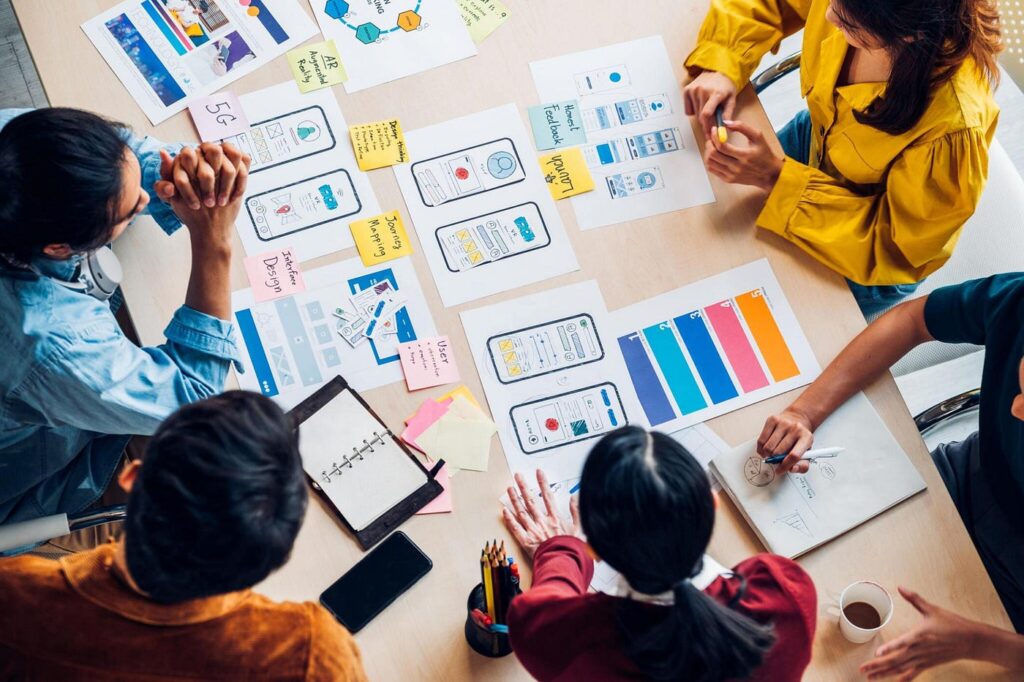
Through dedicated practical studio sessions, you will gain hands-on mastery over the complete digital product design lifecycle. Move systematically from user research, empathy mapping, user personas, and information architecture to low-fidelity wireframing, interactive prototyping in Figma, visual UI styling, and atomic design systems. Learn how to conduct quantitative and qualitative usability testing, calculate UX metrics, handle developer handoffs with pixel-perfect design specifications, and design accessible, WCAG-compliant digital experiences. With dedicated portfolio polishing, Behance/Dribbble case study reviews, design interview coaching, and 100% placement support across Mohali, Chandigarh, and Gurdaspur, Future Finders ensures you secure in-demand roles such as UI/UX Designer, Product Designer, Interaction Designer, and UX Researcher.
What is Modern UI/UX Product Design?
UI/UX design is the disciplined fusion of psychological user research, cognitive ergonomics, and visual interface craft that makes digital products functional, accessible, and delightful to use:
- User Experience (UX) Engineering: Discovering real user pain points through qualitative research, synthesizing insights into user journey maps, defining information architecture, and testing behavioral workflows before writing any code.
- User Interface (UI) Artistry: Crafting visually stunning digital screens using color theory, typographic hierarchy, responsive grid systems, spatial balance, and modern micro-interactions.
- Design Systems & Scalable Product Architecture: Building modular, component-driven design libraries (using Figma Auto-Layout, variants, and design tokens) that ensure visual consistency across iOS, Android, and web platforms.
Core Advantages of a Career in UI/UX Design
As global businesses compete on user experience rather than just raw technical features, a poorly designed application directly harms customer retention and revenue. Tech startups, multinational IT consultancies, and global enterprises in the Tricity and beyond are aggressively investing in dedicated product design talent. Because modern UI/UX designers bridge the vital gap between business objectives, customer psychology, and engineering feasibility, skilled product designers command high starting salaries, exceptional career longevity, and rapid growth toward Lead Product Designer and Creative Director roles.
Learn from Experienced Enterprise Product Designers & Design Leads
Future Finders provides the premier UI/UX design course across Mohali, Chandigarh, and Gurdaspur through experienced product design leads and UX research practitioners. Our mentors bring years of production experience designing enterprise SaaS dashboards, high-volume consumer mobile apps, and fintech web portals for global consultancies and venture-backed startups. Having managed end-to-end design sprints, usability testing labs, and cross-functional engineering handoffs, our instructors ensure that students across Mohali, Chandigarh, and Gurdaspur master design rationale, heuristic evaluations, and business thinking rather than just copying trendy Dribbble concepts that fail in production.
Specialized Allied Tools & Technology Modules
Modern product designers must collaborate closely with frontend developers, product managers, and marketing teams. Our UI/UX design training in Mohali, Chandigarh, and Gurdaspur integrates critical supporting modules into your design roadmap:
- Figma Power Mastery: Master Auto-Layout 5.0, component properties, variants, interactive components, nested instances, smart animations, and variable-based design tokens (colors, spacing, typography).
- Developer Handoff & Specifications: Learn how to create inspection-ready design files, generate clean token documentation, annotate user edge cases, and inspect CSS/Swift/Flutter code snippets to speak the developer’s language.
- Accessibility (a11y) & WCAG Compliance: Design accessible interfaces for all users by understanding color contrast ratios, screen reader hierarchies, focus states, and international web accessibility standards.
- Micro-Interactions & Motion Design: Create engaging UI motion prototypes, loading states, and page transitions using Figma Smart Animate, Protopie, and Lottie vector animations.
- AI-Assisted Design Workflows: Leverage modern generative AI tools for synthetic user research, journey mapping brainstorming, placeholder content generation, and automated design system documentation.
Core Technical Pillars & Practical Curriculum
Our program delivers production-ready design competence with comprehensive studio practice across research, interaction, interface, and validation pillars:
- Foundations of Human-Centered Design (HCD): Understand cognitive load, Norman’s design principles, Gestalt laws of visual perception, Hick’s law, and Fitts’s law applied to digital interfaces.
- UX Research & User Discovery: Conduct user interviews, contextual inquiries, survey design, competitor benchmarking, affinity mapping, empathy maps, and data-driven user persona creation.
- Information Architecture & User Flows: Master card sorting (open and closed), site map structuring, task flows, user journey maps, and navigation schema design for complex applications.
- Wireframing & Low-Fidelity Prototyping: Rapidly sketch low-fidelity paper wireframes and translate them into functional, grayscale wireframes to validate layout concepts and core functionality early.
- Typography, Color Theory & Visual Hierarchy: Master typographic scale, line-height balancing, font pairings, 60-30-10 color rules, dark mode palettes, semantic color tokenization, and visual contrast.
- Layout Grids & Responsive Design: Build fluid 8pt/4pt spatial grids, 12-column responsive web layouts, and adaptive mobile frameworks that scale smoothly across mobile, tablet, and desktop screens.
- Design Systems & Atomic Design Methodology: Build scalable design libraries from scratch following Atomic Design principles (Atoms, Molecules, Organisms, Templates, and Pages) with Figma components and design tokens.
- High-Fidelity Interactive Prototyping: Link complex interactive prototypes with dynamic overlays, scrollable frames, sticky navigation headers, conditional logic, and micro-interactions.
- Usability Testing & Heuristic Evaluation: Conduct unmoderated and moderated usability testing, A/B testing variations, Jakob Nielsen’s 10 usability heuristics audits, and qualitative feedback synthesis.
- UX Metrics & Product Analytics: Learn how UX directly impacts product metrics, including System Usability Scale (SUS), Net Promoter Score (NPS), Task Success Rate, Time on Task, and conversion funnels.
Advanced Product Design: Practical Industry Focus
Whether you enroll for the best UI/UX design training in Mohali, attend classes through the best UI/UX course in Chandigarh, or sign up for dedicated cohorts for the best UI/UX training in Gurdaspur, Future Finders ensures you build real product design competence:
- 100% Industry-Grade Capstone Case Studies: Build two comprehensive, production-ready case studies from the ground up—such as an end-to-end FinTech mobile banking application and a multi-tenant enterprise B2B SaaS dashboard.
- Portfolio Presentation & Storytelling: Document your entire design process—from initial problem statements, user research insights, and wireframe iterations to the final high-fidelity screens—in a compelling, narrative-driven case study format.
- Interactive Design Critiques: Participate in weekly design review sessions, learning how to present design decisions, articulate trade-offs, and incorporate peer and stakeholder feedback constructively.
- Dedicated Career Placement Support: Benefit from design interview prep, portfolio reviews on Behance and Notion, live whiteboard design challenge simulations, and direct placement drives with top IT firms, design agencies, and tech startups.
UI/UX Design Course
- Day 1: Intro to UI/UX, roles, design process → Analyze 3 popular apps
- Day 2: UX fundamentals, user-centered design → Identify usability issues in an app
- Day 3: Design thinking: empathize, define, ideate → Problem statement workshop
- Day 4: User research methods: interviews, surveys → Create a survey, interview 3 users
- Day 5: Competitor analysis and benchmarking → Competitor matrix
- Day 6: Personas and empathy maps → 2 user personas
- Day 7: User journey maps and storytelling → Journey map
- Day 8: Information architecture, sitemaps, card sorting → Sitemap for an app
- Day 9: User flows and task flows → Flow diagrams
- Day 10: Mini Project 1 → Research and IA package
- Day 11: Sketching and low-fidelity wireframes → Paper wireframes
- Day 12: Figma interface, frames, shapes, text → Setup and practice
- Day 13: Figma: Auto Layout, constraints → Responsive card components
- Day 14: Digital wireframes in Figma → Mobile app wireframes
- Day 15: Visual design: color theory and accessibility → Color palette with contrast checks
- Day 16: Typography in UI → Type scale
- Day 17: Grids, spacing, layout → 8pt grid layout
- Day 18: Icons, imagery, illustration in UI → Icon set usage
- Day 19: UI components: buttons, forms, cards, navigation → Component set
- Day 20: Design system basics, styles and tokens → Style guide
- Day 21: Figma components, variants, libraries → Reusable component library
- Day 22: Mobile UI design patterns (iOS and Material) → Mobile screens (5)
- Day 23: Mini Project 2 → High-fidelity mobile app (8 screens)
- Day 24: Web design and responsive layouts → Landing page desktop + mobile
- Day 25: Dashboard and complex UI design → Admin dashboard
- Day 26: Interaction design and micro-interactions → Hover, loading, error states
- Day 27: Prototyping in Figma → Clickable prototype
- Day 28: Advanced prototyping: smart animate, variables → Animated flows
- Day 29: Accessibility (WCAG) → Accessibility audit
- Day 30: Usability testing planning → Test plan and tasks
- Day 31: Conduct usability tests → Test with 3-5 users
- Day 32: Analyze feedback, iterate design → Updated designs
- Day 33: Heuristic evaluation and UX audit → Audit report
- Day 34: UX writing and microcopy → Rewrite app copy
- Day 35: Design handoff, dev specs, Figma Dev Mode → Handoff-ready file
- Day 36: AI tools for UX and design (Figma AI, ChatGPT) → AI-assisted research and design
- Day 37: Capstone: problem definition and research → Research summary
- Day 38: Capstone: IA, flows and wireframes → Wireframes
- Day 39: Capstone: visual design and design system → UI kit
- Day 40: Capstone: high-fidelity screens → Final screens
- Day 41: Capstone: prototype → Interactive prototype
- Day 42: Capstone: usability test and iteration → Improved design
- Day 43: Case study writing and storytelling → Case study draft
- Day 44: Portfolio on Behance/Notion, resume, interview prep → Live portfolio
Day 45: Final presentation and review → Present case study
- Week 1: UI/UX intro, design thinking, UX principles → App teardown, problem statements
- Week 2: User research, personas, empathy maps → Survey, interviews, 2 personas
- Week 3: Information architecture, user flows, journey maps → Sitemap and flows
- Week 4: Sketching, wireframing, Figma basics → Low and mid-fidelity wireframes
- Week 5: Visual design: color, typography, grids, accessibility → Style guide
- Week 6: UI components and design systems → Component library in Figma
- Week 7: Mobile UI design project → 8-10 screen mobile app
- Week 8: Web and responsive design; dashboards → Landing page + dashboard
- Week 9: Interaction design, micro-interactions, prototyping → Animated clickable prototype
- Week 10: Usability testing, heuristic evaluation, iteration → Test report, revised design
- Week 11: UX writing, handoff, AI tools, portfolio → Dev-ready file, case study draft
Week 12: Capstone project and portfolio → Full case study, final presentation
- Week 1: Intro to UI/UX, design process → Analyze popular apps
- Week 2: UX principles, psychology, laws of UX → UX critique report
- Week 3: Design thinking and problem framing → HMW statements
- Week 4: User research: interviews, surveys, observation → Research plan and conduct
- Week 5: Personas, empathy maps, journey maps → Persona and journey set
- Week 6: Information architecture, card sorting, sitemaps → IA for an app
- Week 7: User flows, task flows, sketching → Flow diagrams and sketches
- Week 8: Wireframing (low and high fidelity) in Figma → Wireframe set
- Week 9: Figma deep dive: Auto Layout, components, variants → Reusable components
- Week 10: Visual design: color, typography, spacing, grids → Style guide
- Week 11: UI patterns: mobile (iOS/Android) → Mobile UI screens
- Week 12: UI patterns: web, responsive, dashboards → Responsive website + dashboard
- Week 13: Design systems: tokens, documentation, libraries → Complete design system
- Week 14: Interaction and motion design → Micro-interaction set
- Week 15: Prototyping and advanced Figma (variables, smart animate) → Advanced prototype
- Week 16: Accessibility and inclusive design → WCAG audit and fixes
- Week 17: Usability testing: planning and moderation → Test plan
- Week 18: Usability testing: analysis, heuristic evaluation, A/B testing → Findings report
- Week 19: UX writing, microcopy, content design → Rewritten product copy
- Week 20: Developer handoff, HTML/CSS basics for designers → Handoff file, simple coded page
- Week 21: Product thinking, UX metrics, working with Agile teams → Product case analysis
- Week 22: AI tools for designers; AI product UX → AI-assisted workflow, chatbot UI
- Week 23: Capstone project (end to end) → Research, UI, prototype, testing
Week 24: Case study, portfolio, interview and freelancing prep → Published portfolio, final presentation
Apply here
| Big Data Hadoop Course Fee and Duration | |||
|---|---|---|---|
| Track | Regular Track | Weekend Track | Fast Track |
| Course Duration | 150 - 180 days | 28 Weekends | 90- 120 days |
| Hours | 2 hours a day | 3 hours a day | 6+ hours a day |
| Training Mode | Live Classroom | Live Classroom | Live Classroom |